FILE G2 / SECURE FOLDER IPHONE
Does iPhone Have a Secure Folder? The Full Answer for iOS Users
Samsung Galaxy phones ship with a feature called Secure Folder — an encrypted, Knox-protected sandbox for apps, photos, and files. iPhone users who switch from Android often ask whether iOS offers the same thing. The short answer is no. Apple does not include a Secure Folder equivalent in iOS. The longer answer involves the Hidden Album in Photos, Guided Access, Screen Time restrictions, and third-party vault apps that replicate the Secure Folder experience with stronger cryptography.
UPDATED · 2026-05-16 · REVIEWED BY APP-VAULT
TL;DR
iOS has no built-in Secure Folder. The Hidden Album in Photos hides images from the main library but leaves them unencrypted on disk. Guided Access and Screen Time lock the phone into one app but do not create a separate encrypted space. For a true Secure Folder equivalent on iPhone, you need a third-party vault app like App-Vault that encrypts files individually with AES-256-GCM, binds the encryption key to the Secure Enclave, and stores nothing on a server.
Samsung Secure Folder runs on the Knox security platform. It creates an encrypted partition on the device where you can install apps, store files, and take photos without them appearing in the main gallery. The folder is locked behind a separate PIN, pattern, or biometric. If someone unlocks your phone, they still cannot open Secure Folder.
iOS has no equivalent.
Apple provides a set of partial tools — the Hidden Album, Guided Access, Screen Time — but none of them create an encrypted, isolated container. Each tool solves one small piece of the problem and leaves the rest exposed.
This article walks through every native option, explains exactly what each one does and does not protect, and then shows how a third-party vault app like App-Vault fills the gap with encryption that matches or exceeds Samsung Secure Folder.
What Apple gives you natively
Apple does not call any of these features a secure folder. That is intentional. None of them are secure in the cryptographic sense.
The Hidden Album in Photos
The Hidden Album is the most commonly mistaken feature. Users move photos into it expecting privacy. What actually happens: the photos disappear from the Moments, Years, and Collections views. They remain in the same unencrypted database file on disk. Any app with file-system access, any forensic tool, or anyone who knows the setting exists can view them.
The Hidden Album is a view filter, not a security boundary. Apple even places the Hidden Album toggle in Settings > Photos, where anyone holding your unlocked phone can disable it and see every hidden image.
Guided Access
Guided Access locks the iPhone into a single app. You set a passcode, hand the phone to someone, and they cannot leave the app or access anything else. It is useful for a child using a learning app or a customer signing a document on your device.
Guided Access does not create a secure folder. It restricts navigation. The app you are locked into still has full access to your data. If that app is Photos, the other person can scroll through your entire library.
Screen Time restrictions
Screen Time lets you block specific apps behind a separate PIN. You can hide the App Store, prevent app deletion, or restrict adult content.
Screen Time is a parental control tool. It is not a secure folder. The apps you restrict remain visible on the Home Screen. A determined person can guess the four-digit Screen Time passcode. Apple provides no encryption, no sandboxing, and no plausible deniability.
The Files app
The Files app stores documents in the clear. It does not support password-protected folders. You can create folders, rename them, and organize them, but anyone with access to your unlocked iPhone can open every file.
Files does support encrypted disk images if you create a DMG on a Mac and transfer it. That workflow is impractical for most users. It requires a Mac, command-line tools, and manual management of the encrypted volume.
What Samsung Secure Folder does that iOS cannot
Samsung Secure Folder is not just a hidden directory. It is a Knox-based container that:
- Encrypts all files with AES-256
- Isolates apps inside the container so they cannot access data outside it
- Supports a separate Samsung account for backup
- Offers a “hide Secure Folder” option that removes the icon from the app drawer
iOS does not allow third-party apps to create isolated containers at the operating-system level. Apple’s sandbox model prevents one app from reading another app’s data, but it does not give any app the ability to carve out a hidden partition. Every third-party vault app on the App Store works within the sandbox of its own container.
That means no iPhone vault app can match Samsung Secure Folder feature-for-feature at the OS level. What they can do — and what App-Vault does — is build a software-based encrypted vault inside the app’s sandbox that uses cryptography to simulate the same protection.
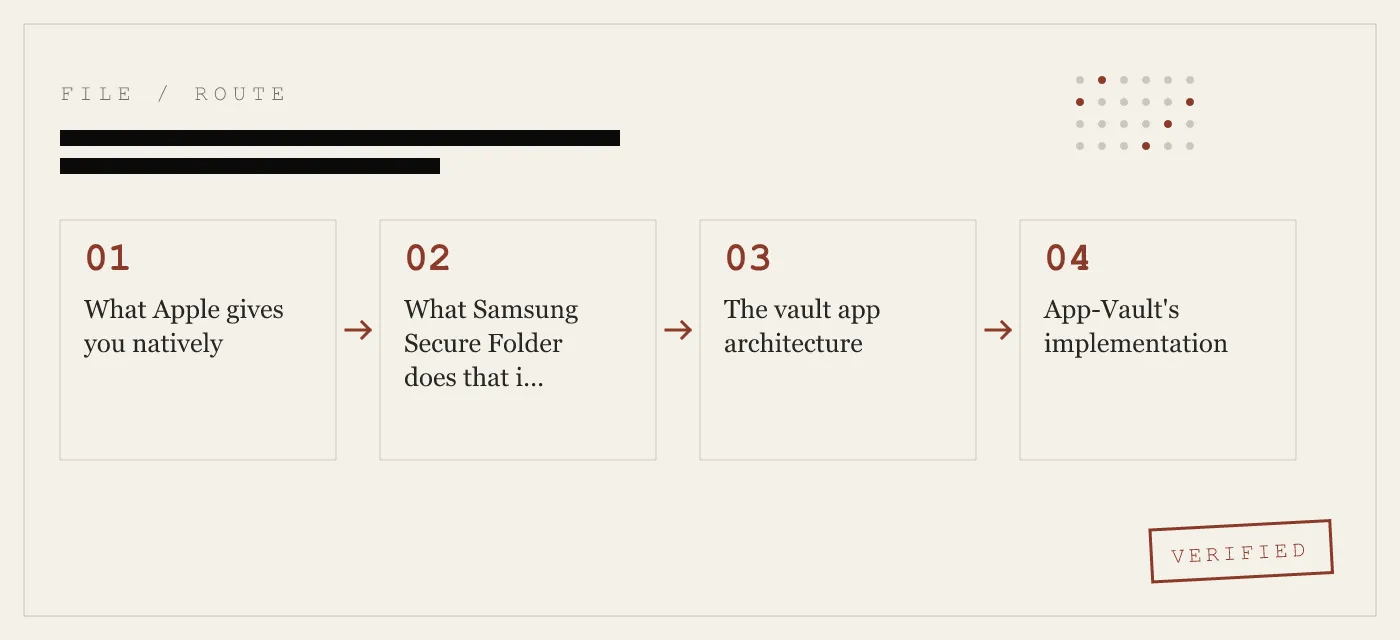
The vault app architecture
A secure folder app on iPhone works like this:
- The app creates an encrypted database inside its own sandboxed container.
- When you import a photo or file, the app reads the original, encrypts it with a symmetric cipher, and writes the ciphertext to the database.
- The app deletes the original from the Photos library or Files app (with your permission).
- To view a file, the app reads the ciphertext, decrypts it in memory, and displays it. The decrypted data never touches disk.
- The encryption key is derived from something you know — a pattern, a PIN, or a passphrase — and optionally wrapped by a hardware key from the Secure Enclave.
This architecture is the closest thing to a Secure Folder on iPhone. It is not a Knox container, but it provides the same three properties: confidentiality, access control, and plausible deniability.
App-Vault’s implementation
App-Vault implements this architecture with specific cryptographic choices that matter for security.
Cipher and key derivation
Every file in App-Vault is encrypted with AES-256 in Galois/Counter Mode (GCM). GCM is an authenticated encryption mode — it provides both confidentiality and integrity. An attacker cannot modify the ciphertext without detection. Each file receives a unique 96-bit nonce, which prevents two files encrypted with the same key from leaking information about each other.
The key is derived from your unlock pattern using PBKDF2-SHA256 at 600,000 iterations. That iteration count matches the OWASP 2026 recommendation for password-based key derivation. A 128-bit salt is generated per installation and combined with the pattern to produce the derived key.
Secure Enclave binding
The derived key does not live in plaintext in the app’s memory. App-Vault sends the derived key to the iPhone Secure Enclave, which wraps it with a key that never leaves the chip. The wrapped key is stored in the app’s sandbox. To decrypt a file, the app sends the wrapped key back to the Secure Enclave, which unwraps it, performs the decryption inside the chip, and returns the plaintext.
This means an attacker who extracts the app’s sandbox data cannot decrypt files without access to your specific iPhone’s Secure Enclave. The hardware binding prevents offline brute-force attacks.
No network calls
App-Vault makes zero network calls by default. There is no server to hack, no cloud sync to intercept, no telemetry to leak. The app functions entirely on-device.
Encrypted iCloud Backup is opt-in. When enabled, files are sealed with a separate per-device backup key before upload. Apple receives only ciphertext. The backup key is derived from the same Secure Enclave-bound material, so even Apple cannot decrypt the backup.
Catalog encryption
The list of files inside the vault — file names, dates, sizes — is also encrypted. An attacker with raw access to the device cannot tell how many files are stored or what they are called. This prevents the “folder count” attack where an observer sees that a vault has 47 items and infers that the vault is worth targeting.
Features that match the Secure Folder experience
Samsung Secure Folder users expect certain behaviors. App-Vault replicates them within iOS constraints.
Calculator Launcher
The Calculator Launcher is a fully functional iOS calculator. It performs arithmetic, stores no history, and looks identical to the system calculator. To enter the vault, you long-press the equals key. The app then switches to the encrypted vault view.
This is not a “fake calculator” designed to deceive a spouse. It is an alternate app icon, approved under Apple guideline 4.3, that provides a discreet entry point. The intended use case is shoulder-surfing in public — someone watching your screen sees a calculator, not a vault.
Decoy Vault
The Decoy Vault is a second, mathematically independent vault catalog. You set a different unlock pattern for it. When someone unlocks with the decoy pattern, they see a separate set of files that you have curated. The real vault remains sealed behind the primary pattern.
This is useful when one physical device serves more than one person. A family iPad, for example, can have a decoy vault with kid-appropriate content and a real vault with financial documents.
No recovery
Like Samsung Secure Folder, App-Vault does not offer password reset. Forget the pattern and the vault stays sealed forever. An optional written recovery passphrase is generated during setup. Store it physically, not in a digital file.
What App-Vault does not defend against
Honesty about limits builds trust. App-Vault does not defend against:
- Malware on a jailbroken device. If the operating system is compromised, the Secure Enclave binding can be bypassed. App-Vault assumes a stock, up-to-date iOS installation.
- Physical extraction by a state actor. A sufficiently funded attacker with a jailbreak exploit and a chip-off forensics lab can defeat any software-based vault. App-Vault’s encryption makes this expensive, but not impossible.
- Compulsory disclosure. If you are compelled by law to unlock the vault, App-Vault provides no technical mechanism to resist. The Decoy Vault offers plausible deniability, but it is not a legal protection.
Who should use a secure folder app
The people who need a secure folder on iPhone are the same people who use Samsung Secure Folder:
- Journalists storing confidential sources and unpublished material
- Lawyers holding privileged client communications
- Medical professionals with patient data that falls under HIPAA
- Travelers crossing borders where customs officers inspect devices
- Shared device users — family iPads, work-issued iPhones, loaner phones
- Anyone selling or trading in an iPhone who wants to ensure personal files are not recoverable after a factory reset
How App-Vault compares to other vault apps
The App Store contains dozens of vault apps. Most of them use AES-256 encryption, but the implementation details vary widely.
- Keepsafe is the category leader by install count. It uses AES-256 but stores files on cloud servers by default. The full feature-by-feature breakdown is on App-Vault vs Keepsafe.
- Vaultaire is the closest competitor to App-Vault in terms of zero-knowledge design. It also uses Secure Enclave binding and avoids cloud storage. The comparison is on App-Vault vs Vaultaire.
- Most ad-supported vault apps run third-party SDKs that send usage telemetry off-device. App-Vault includes no third-party SDKs and collects no data.
The key differentiator for App-Vault is the combination of AES-256-GCM with Secure Enclave wrapping, zero network calls, catalog encryption, and the calculator launcher — all in a single app with no subscription.
The bottom line
iPhone does not have a Secure Folder. Apple has not built one, and the native tools that exist — Hidden Album, Guided Access, Screen Time — do not provide encryption or access control.
A third-party vault app is the only way to get an encrypted, password-protected container on iOS. App-Vault implements this with the same cryptographic primitives that Samsung Secure Folder uses, adds hardware key binding via the Secure Enclave, and provides features like the Calculator Launcher and Decoy Vault that replicate the Secure Folder experience within iOS constraints.
If you are coming from Android and asking “does iPhone have a Secure Folder?”, the honest answer is no. The practical answer is that App-Vault gets as close as iOS allows.
Sources
- Apple Support: Hide and show photos on iPhone
- Apple Support: Use Screen Time on iPhone
- Apple Platform Security guide: Data protection overview
- Apple Developer: App Privacy details on the App Store
- NIST FIPS 197: Advanced Encryption Standard
DIAGRAM · 01
DOSSIER
QUESTIONS
10 sharp answers.
-
01 Does iPhone have a Secure Folder like Samsung?
No. iOS does not include a Secure Folder. Samsung Secure Folder is a Knox-based encrypted sandbox. iPhone users must use a third-party vault app to get equivalent functionality. -
02 What is the Hidden Album on iPhone?
The Hidden Album is a folder inside the Photos app that hides selected images from the main library. It does not encrypt them. Anyone who knows the setting exists can disable it. -
03 Can I password protect a folder on iPhone?
Not natively. iOS does not allow folder-level password protection. Third-party apps like App-Vault create encrypted vaults that require a pattern or passphrase to open. -
04 Is the Files app on iPhone secure?
The Files app stores documents in the clear on the device. It supports encrypted volumes only if you create a DMG on a Mac and transfer it. That workflow is impractical for most users. -
05 How do I create a hidden folder on iPhone?
To create a hidden folder, you install a vault app. The app creates an encrypted container that does not appear in the Files app, the Photos library, or the Home Screen. -
06 What is the best secure folder app for iPhone?
The best app depends on your threat model. App-Vault offers AES-256-GCM encryption, Secure Enclave binding, zero network calls, a calculator launcher, and a decoy vault. -
07 Can I hide photos on iPhone without an app?
You can move photos to the Hidden Album, but they remain unencrypted. For true concealment with encryption, you need a third-party vault app. -
08 Does App-Vault work on iPad?
Yes. App-Vault runs on iPhone and iPad. The encrypted vault syncs via opt-in iCloud Backup, with all files sealed before upload. -
09 Is App-Vault free?
App-Vault uses a one-time purchase model. There is no subscription, no ads, and no telemetry. The privacy nutrition label declares no data collected. -
10 What happens if Apple removes the app from the store?
App-Vault does not rely on a server. The app continues to work as installed. Backups stored via iCloud remain recoverable on any device that has the app installed.
RELATED DOSSIERS
Keep reading.
9 ENTRIES
- LINK / 01 · GUIDES
Calculator vault apps for iPhone
How calculator vault apps hide their presence behind a functional calculator.
- LINK / 02 · GUIDES
Is the iPhone Hidden Album secure?
The Hidden Album is not encryption. What hidden photo features actually do.
- LINK / 03 · COMPARE
App-Vault vs Keepsafe
Feature-by-feature comparison — encryption, privacy, pricing, platform support.
- LINK / 04 · FEATURE
Pattern Lock
The 5×5 grid lock screen that derives the encryption key.
- LINK / 05 · SECURITY
Threat model
What App-Vault defends against and what it does not.
- LINK / 06 · SECURITY
Zero-knowledge architecture
No servers, no accounts, no telemetry — what zero-knowledge means in practice.
- LINK / 07 · GUIDE
What Is AES-256 Encryption? A Non-Cryptographer’s Guide
AES-256 is the encryption standard used by governments and banks. Learn what 256-bit AES means, how it works, and where it falls short.
- LINK / 08 · GUIDE
AES-256-GCM: The Authenticated Encryption Standard That Secures Your iPhone Files
AES-256-GCM is the authenticated cipher behind TLS 1.3, WireGuard, and Signal. How it works, its nonce discipline, and why App-Vault uses it for file encryption.
- LINK / 09 · GUIDE
How to Permanently Delete Photos Before Selling or Trading In Your iPhone
A step-by-step checklist for wiping sensitive photos before selling, trading in, or donating an iPhone — including what iOS delete actually does and what it doesn't.
GET STARTED
Seal the vault.
Free to download. The free tier holds one file. Premium removes the limit — Weekly from $3.99 or Yearly from $29.99 with a 7-day free trial.