FILE P7 / BEFORE YOU HAND IT OVER
Selling Your iPhone? Here Is What Factory Reset Leaves Behind
A factory reset does not overwrite the data on your iPhone's NAND flash. Deleted photos, messages, and files sit in unused blocks until the storage controller reclaims them — and forensic tools can read those blocks long before that happens. This page explains what survives a reset, what iCloud Photos keeps on Apple's servers, and the checklist to follow before the device leaves your hands.

UPDATED · 2026-05-16 · REVIEWED BY APP-VAULT
TL;DR
Factory reset on an iPhone marks storage blocks as available but does not overwrite them. Deleted photos, messages, and files remain recoverable from NAND flash until the controller reclaims those blocks — a process forensic tools can trigger. iCloud Photos keeps a full copy on Apple's servers even after you erase the device. App-Vault's File Shredder overwrites vault files with multiple write passes before deletion, and the pre-sale checklist below covers every step before you hand the phone to a buyer, a trade-in program, or a family member.
What Factory Reset Actually Does
Tap “Erase All Content and Settings” and iOS does two things: it destroys the file system encryption keys and it marks every storage block as available for reuse. The data itself — the ciphertext sitting in NAND flash — stays put until the storage controller writes new data over it.
On iOS 15 and later, Apple redesigned the key hierarchy so that destroying the file system key renders the ciphertext practically unrecoverable without that key. This is a meaningful improvement. But “practically unrecoverable” is not “physically gone.” The blocks still hold the old data. A forensic tool with raw NAND access — the kind used by law enforcement and data recovery labs — can read those blocks directly, bypassing the file system entirely.
On iOS 14 and earlier, the situation is worse. The encryption key hierarchy was less granular, and discarding the file system key left more of the underlying data accessible. Devices that shipped with or ran iOS 14 at any point in their lifecycle may have residual data in blocks that were never re-encrypted under the newer scheme.
The takeaway: factory reset is a logical erase, not a physical one. It tells the operating system the blocks are empty. It does not write zeros or random data over the old content.
What Survives in the Recently Deleted Album
The Photos app does not delete images when you tap the trash icon. It moves them to the Recently Deleted album, where they sit for 30 days. During that window, the files are fully intact — same resolution, same metadata, same location tags. The user can recover them with one tap.
Factory reset does not clear this album. The 30-day timer is tied to the file system metadata, and when the reset destroys the keys, the album’s contents become inaccessible to the Photos app — but the underlying data remains in NAND blocks. If the device ran iOS 14 or earlier, that data is recoverable with forensic tools.
Before selling or trading in an iPhone, empty the Recently Deleted album manually. Open Photos, go to Albums, tap Recently Deleted, select all, and delete. Then proceed with the rest of the checklist below.
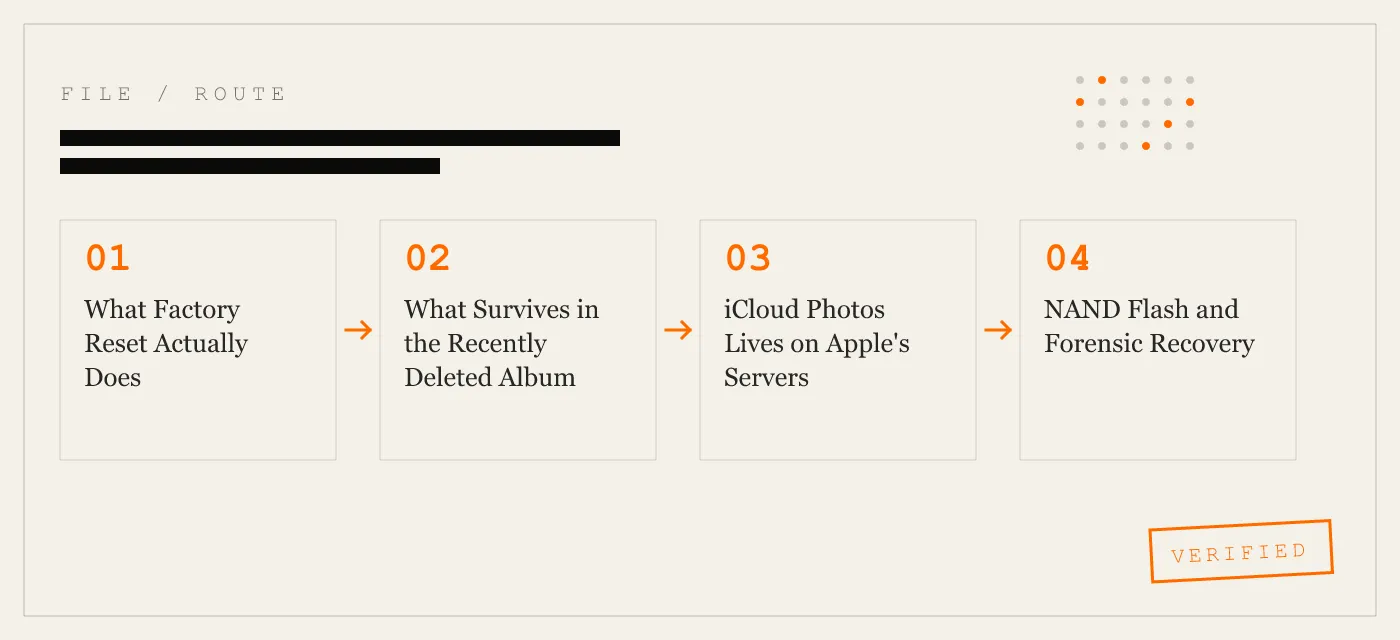
iCloud Photos Lives on Apple’s Servers
Erasing an iPhone removes the local copy of every photo. It does nothing to the iCloud Photos library. That library lives on Apple’s servers, tied to the Apple ID, and it will sync to any new device signed into the same account.
This creates two problems for someone selling an iPhone.
First, if the seller forgets to sign out of iCloud before erasing, Activation Lock stays active. The new owner cannot set up the phone. The seller has to go to appleid.apple.com, sign in, and manually remove the device from the account. This is a support headache, not a data leak — but it delays the sale.
Second, if the seller wants the iCloud Photos library gone, that is a separate action. Signing out of iCloud stops the sync. Deleting the library requires visiting iCloud.com or another device signed into the same Apple ID and removing the photos there. The erase-all step on the iPhone does neither of these things.
NAND Flash and Forensic Recovery
Every iPhone stores data on NAND flash chips. NAND flash works in pages (typically 4 KB) and blocks (typically 256 pages). Writes happen at the page level. Erases happen at the block level. When iOS deletes a file, it marks the pages as invalid but does not erase the block. The block stays dirty — full of old data — until the flash controller’s garbage collection process reclaims it.
Forensic tools exploit this. Chip-off forensics involves desoldering the NAND chip and reading it directly with a programmer. This bypasses the iOS file system entirely. The tool reads every block, valid or not, and reconstructs files from the raw data. This technique works on any iPhone regardless of iOS version, as long as the blocks have not been overwritten.
Logical extraction tools like Cellebrite UFED and GrayKey operate at a higher level — they communicate with the iOS file system through the device’s debug interface. On iOS 14 and earlier, these tools can recover deleted photos, messages, and app data from unused blocks. On iOS 15 and later, the redesigned key hierarchy makes this harder, but not impossible if the device is unlocked or the tool can exploit a vulnerability.
The only defense against both chip-off and logical extraction is physical overwrite. Write new data over the old blocks so that the original content is gone at the hardware level.
What App-Vault’s File Shredder Does
App-Vault’s File Shredder overwrites vault files with multiple write passes before deleting them. The process targets the encrypted ciphertext stored in the app’s sandbox — the AES-256-GCM encrypted files that App-Vault stores on behalf of the user.
Here is the sequence. The user selects files for shredding. App-Vault opens each file and writes random data over its full length, repeating the write across multiple passes. Then it deletes the file through the standard iOS file system call. The result: the NAND blocks that held the original ciphertext now hold random data. Even if a forensic tool reads those blocks, it finds the overwrite passes, not the original encrypted content.
This does not protect files outside the app’s sandbox. Photos in the Camera Roll, messages in the Messages app, data in other apps — those are outside App-Vault’s control. The File Shredder is designed for the vault’s own files: the photos and documents the user imported into App-Vault for encrypted storage.
For a full-device overwrite, the user still needs to perform the factory reset. The File Shredder closes the gap for the specific files that matter most — the ones the user moved into the vault precisely because they did not want them recoverable.
The Pre-Sale Checklist
Follow this checklist in order before handing the iPhone to a buyer, a trade-in program, or a family member.
-
Empty the Recently Deleted album. Open Photos, go to Albums, tap Recently Deleted, select all, delete. This removes the 30-day recoverable window for photos in the Camera Roll.
-
Sign out of iCloud. Settings → [your name] → Sign Out. Enter the Apple ID password, choose to keep or remove local data (it does not matter — you are about to erase everything). This deactivates Activation Lock.
-
Sign out of iMessage. Settings → Messages → Send & Receive → tap the Apple ID → Sign Out. This prevents the new owner from receiving messages addressed to your phone number.
-
Remove the device from your Apple ID. Visit appleid.apple.com, sign in, go to Devices, select the iPhone, and remove it. This is a backup step in case the on-device sign-out did not complete.
-
Run App-Vault’s File Shredder. Open App-Vault, select all vault files, run the File Shredder. This overwrites the encrypted vault data with random bytes before deletion. If you use the Decoy Vault, shred the decoy files as well — the decoy vault is mathematically independent, and its files occupy separate blocks.
-
Erase all content and settings. Settings → General → Transfer or Reset iPhone → Erase All Content and Settings. Enter the passcode, confirm the erase. iOS will destroy the file system keys and reboot to the setup screen.
-
Verify the setup screen. After the erase, the iPhone should display the “Hello” setup screen in multiple language options. If it asks for an Apple ID and password, Activation Lock is still active — go back to step 2.
-
Remove the SIM card. If the iPhone uses a physical SIM, eject it. If it uses eSIM, the erase process should remove the eSIM profile, but verify in Settings → Cellular that no plans remain.
What This Does Not Protect Against
App-Vault’s File Shredder overwrites files inside the app’s sandbox. It does not overwrite the Camera Roll, the Messages database, the Mail cache, or data from other apps. For those, the factory reset is the only tool — and as explained above, factory reset is a logical erase, not a physical one.
If the iPhone ran iOS 14 or earlier, residual data from the Camera Roll and Messages may survive in NAND blocks even after the erase. The risk is highest on devices that were never updated to iOS 15, or that spent significant time on iOS 14 before upgrading.
iCloud data is a separate threat model. If the seller’s photos synced to iCloud, those photos exist on Apple’s servers regardless of what happens to the device. The seller must delete the iCloud Photos library separately, or the photos will persist in the cloud and sync to the next device signed into the same Apple ID.
App-Vault does not make network calls by default. It has no cloud sync, no account, no telemetry. The zero-knowledge architecture means App-Vault cannot see the user’s files, and it cannot leak them. But this also means App-Vault cannot delete files from iCloud or from other apps on the device. The scope is the vault’s own sandbox.
How This Differs from the How-To Guide
The companion guide at /guides/wipe-photos-before-selling-iphone/ walks through the same steps as a linear tutorial — open this menu, tap that button, confirm the deletion. It is written for users who want instructions they can follow on the phone.
This page is written for users who want to understand the problem before they act. Why factory reset is insufficient. What NAND flash does with deleted data. What iCloud keeps on its servers. The checklist above is the same sequence, but the context here is the threat model, not the tap path.
If you are ready to act, the checklist is complete. If you want to understand why each step matters, the sections above explain the mechanism.
Why App-Vault for This Use Case
App-Vault stores files with AES-256-GCM encryption — unique 96-bit nonce per file, PBKDF2-SHA256 key derivation at 600,000 iterations, hardware-bound through the iPhone Secure Enclave. The vault catalog itself is encrypted, so an attacker with raw NAND access cannot even determine how many files exist.
The Calculator Launcher gives the app a fully functional iOS calculator interface with a long-press equals-key shortcut to the vault. The Decoy Vault provides a second 5×5 pattern that opens a separate, mathematically independent catalog. Both features are designed for the scenarios this page addresses: handing a device to someone who may scroll through the app library, or selling a phone to a buyer who may probe its contents.
The File Shredder is the feature that closes the gap factory reset leaves behind. Overwrite the vault files, then erase the device. The buyer gets a clean iPhone. The seller gets certainty that the vault’s contents are gone at the hardware level.
For a feature-by-feature comparison with other vault apps, see App-Vault vs Keepsafe and App-Vault vs Vaultaire.
Sources
- NIST SP 800-88 Rev. 1: Guidelines for Media Sanitization
- Apple Platform Security guide: Data protection overview
- Apple Support: What to do before you sell, give away, or trade in your iPhone
- NIST FIPS 197: Advanced Encryption Standard
DIAGRAM · 01
DOSSIER
QUESTIONS
10 sharp answers.
-
01 Is factory reset enough before selling my iPhone?
It depends on the iOS version and the threat model. On iOS 15 and later, discarding the file system key makes casual recovery infeasible. On iOS 14 and earlier, or when selling to a buyer who may use forensic tools, an overwrite pass is the only reliable guarantee. -
02 How long do deleted photos stay recoverable in the Recently Deleted album?
30 days. The Photos app holds deleted items in this album until the window expires. The user can also empty it manually. Factory reset does not touch this album — it persists until the timer runs out or the user clears it. -
03 If I erase my iPhone, are my iCloud Photos deleted?
No. iCloud Photos lives on Apple's servers. Erasing the device removes the local copy. The cloud library remains intact and will sync to any new device signed into the same Apple ID. Sign out of iCloud before erasing, and delete the library separately if you want it gone. -
04 What is NAND flash and why does it matter for data recovery?
NAND flash is the non-volatile storage chip inside every iPhone. When iOS deletes a file, it marks the storage blocks as available but does not overwrite them. The original data remains until the flash controller reclaims those blocks for new writes. Forensic tools read the raw blocks directly. -
05 Can a buyer recover my data after a trade-in?
On older iPhones or iOS versions before 15, forensic tools can extract data from unused blocks. Apple's trade-in program includes a wipe step, but the same NAND flash mechanics apply. If the device ran an older iOS version at any point, residual data may persist. -
06 Does App-Vault's File Shredder work on iOS?
Yes. App-Vault's File Shredder overwrites vault files with multiple write passes before deletion. The overwrite targets the encrypted ciphertext stored in the app's sandbox, ensuring the original data cannot be recovered from the underlying NAND blocks. -
07 What is the difference between factory reset and File Shredder?
Factory reset discards the file system encryption key and marks blocks as available. File Shredder overwrites the actual data in those blocks before deletion. Factory reset is a logical erase; File Shredder is a physical overwrite. -
08 Should I sign out of iCloud before erasing my iPhone?
Yes. Sign out of iCloud, sign out of iMessage, and remove the device from your Apple ID account at appleid.apple.com. This prevents Activation Lock from triggering on the new owner and severs the iCloud Photos sync. -
09 What about third-party vault apps — do they protect my data after a reset?
Only if the app overwrites its own files before deletion. Most vault apps rely on iOS's standard deletion, which leaves data in NAND blocks. App-Vault's File Shredder is the overwrite step that closes this gap. -
10 Is there a pre-sale checklist I can follow?
Yes. The checklist below covers every step: empty Recently Disconnect iCloud, sign out of accounts, run File Shredder on vault files, then perform the factory reset. Follow it in order.
RELATED DOSSIERS
Keep reading.
9 ENTRIES
- LINK / 01 · How-To Guide
How to Wipe Photos Before Selling Your iPhone
Step-by-step instructions for deleting photos, clearing Recently Deleted, and disconnecting iCloud Photos before a sale or trade-in.
- LINK / 02 · App-Vault Feature
Calculator Launcher
Fully functional iOS calculator with a long-press equals-key shortcut to the encrypted vault.
- LINK / 03 · App-Vault Feature
Decoy Vault
Second 5×5 pattern that opens a separate, mathematically independent vault catalog.
- LINK / 04 · App-Vault Concept
AES-256-GCM Encryption
The full cryptography stack behind App-Vault's vault — cipher, key derivation, and hardware binding.
- LINK / 05 · App-Vault Concept
Threat Model
What App-Vault defends against and what it does not — honest limits, no overstatement.
- LINK / 06 · Comparison
App-Vault vs Keepsafe
How App-Vault's zero-knowledge architecture compares to the category leader by install count.
- LINK / 07 · SCENARIO
iPhone Privacy for International Travelers
Practical device privacy for customs stops, lost phones abroad, and vaulted travel documents. No servers, no accounts, AES-256-GCM.
- LINK / 08 · ALTERNATIVE
Keepsafe alternative for iPhone
Looking for a Keepsafe alternative on iPhone? Compare App-Vault, Vaultaire, and Private Photo Vault on storage model, account requirements, and pricing.
- LINK / 09 · ALTERNATIVE
LockMyPix alternative for iPhone
Need a LockMyPix alternative on iPhone? We compare App-Vault, Keepsafe, Vaultaire, and Private Photo Vault on security, pricing, and fit.
GET STARTED
Seal the vault.
Free to download. The free tier holds one file. Premium removes the limit — Weekly from $3.99 or Yearly from $29.99 with a 7-day free trial.