FILE A1 / ALTERNATIVES · 2026
Vaultaire Alternative: App-Vault vs Vaultaire
Vaultaire is a credible local-only iPhone vault, but the search for a Vaultaire alternative usually comes down to three gaps: no calculator-style launcher, no published cryptography details, and no decoy-style second vault. This guide compares Vaultaire directly with App-Vault, then places Keepsafe and Private Photo Vault in context for users considering a broader switch.
UPDATED · 2026-07-22 · REVIEWED BY APP-VAULT
TL;DR
If you want a Vaultaire alternative, App-Vault is the closest like-for-like option for iPhone users who want local-only storage without an account, plus a calculator launcher, a decoy vault, and published cryptography. Vaultaire stays simpler, but App-Vault is stronger on transparency and privacy controls.
What makes someone search for a Vaultaire alternative
Vaultaire already does several things right. It is local-only, does not ask for an account, and keeps the interface minimal. For many people, that is enough: open the app, unlock it, view albums, export when needed.
But “vaultaire alternative” searches usually come from one of three missing pieces:
- No public cryptography details. Vaultaire may store files locally, but the source material we reviewed does not publish its cipher, mode, or key-derivation design.
- No disguise layer. There is no calculator-style launcher or alternate presentation that helps the app blend in on a shared device.
- No second vault flow. Some users want a separate unlock path that opens a different album for lower-sensitivity content.
If those gaps do not matter to you, Vaultaire is still a reasonable minimalist vault. If they do matter, App-Vault is the closest direct alternative.
Vaultaire vs App-Vault at a glance
This is the comparison most searchers are actually looking for.
| Category | Vaultaire | App-Vault |
|---|---|---|
| Account required | No | No |
| Storage model | Local-only | On-device only |
| Lock method | PIN-style flow in the source article | 5×5 pattern lock |
| Face ID | Yes | Yes, for quick re-unlock |
| Published cryptography | No public details cited | Yes: AES-256-GCM, PBKDF2-SHA256, Secure Enclave key wrapping |
| Calculator launcher | No | Yes |
| Decoy vault | Not documented in the source article | Yes, second pattern opens a separate album |
| iCloud Backup inclusion | Not documented here | Excluded from iCloud Backup and iTunes/Finder backups |
| Recovery method | Not documented here | BIP-39 12-word recovery phrase |
| Free tier | Not established in the source article | Yes, one file |
| Paid structure | Subscription model in the source article | Free tier, Weekly from $3.99, Yearly from $29.99 with 7-day trial |
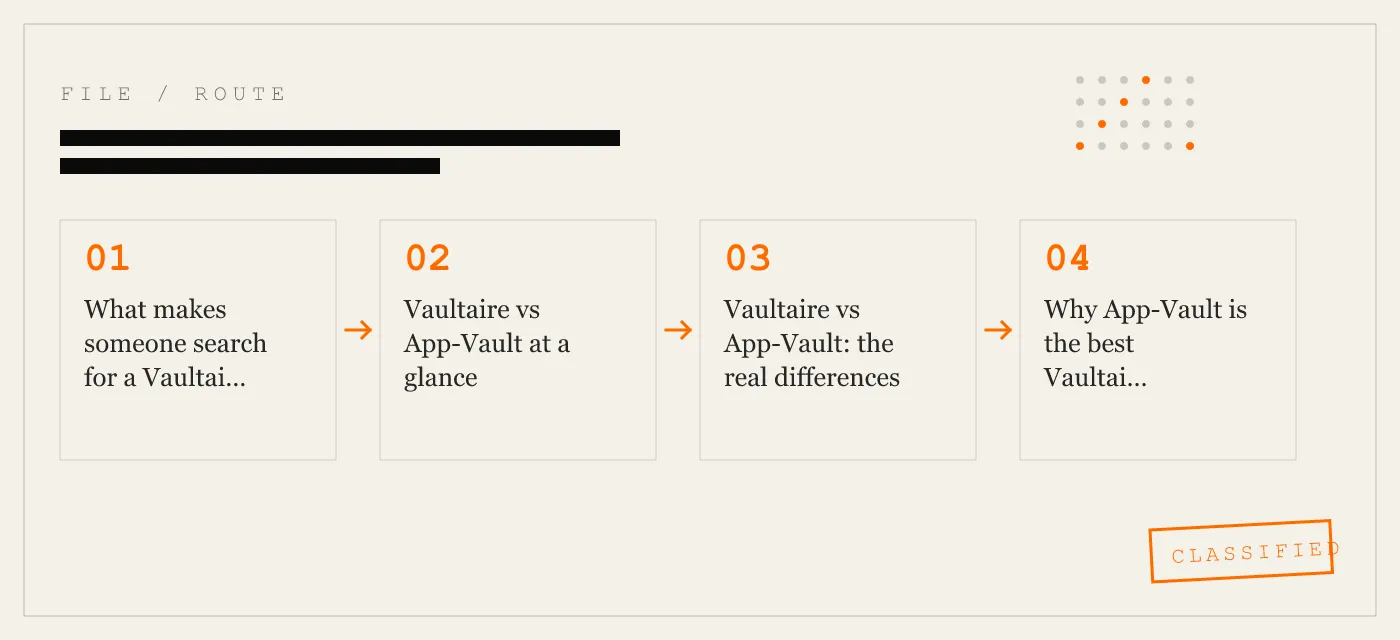
Vaultaire vs App-Vault: the real differences
1. Transparency
This is the clearest separation.
Vaultaire presents as a local-only vault, but the source article does not cite a public security page with its cipher, authentication mode, or key derivation. That does not prove weak security. It does mean you are being asked to trust an opaque implementation.
App-Vault publishes the stack in plain terms:
- AES-256-GCM for file confidentiality and integrity
- PBKDF2-SHA256 for deriving a key from the 5×5 pattern
- 600,000 PBKDF2 iterations
- Secure Enclave-backed key wrapping
- Vault contents excluded from iCloud Backup and iTunes/Finder backups
- No account and no server holding vault contents
For users comparing Vaultaire vs App-Vault on trust alone, App-Vault is easier to inspect.
2. Unlock model: PIN simplicity vs pattern-derived key
Vaultaire’s appeal is its simplicity. A PIN-style unlock is familiar and fast. For users who want the shortest onboarding path, that is a real advantage.
App-Vault uses a 5×5 pattern instead. That adds a step mentally, but it is not just a cosmetic lock screen. The pattern is part of the key derivation path. App-Vault also shows a 12-word recovery phrase during onboarding and makes clear that if you forget the pattern and did not keep the recovery phrase, there is no recovery process.
That is a stronger privacy posture, but it is also less forgiving.
3. Disguise features
Vaultaire does not offer a calculator launcher.
App-Vault does. With Calculator Launcher enabled, the app can appear on the Home Screen as a working calculator with one of three alternate icons. Long-press the equals key, draw the pattern, and the vault opens.
For privacy-sensitive but legitimate situations — a shared family device, customs and border travel, journalism, legal or medical fieldwork, selling a phone, or simple shoulder-surfing resistance — this is a meaningful difference.
4. Decoy content
The source article does not document any decoy-vault feature in Vaultaire.
App-Vault includes a Decoy Vault. A second pattern opens a separate encrypted album with an independent catalog and independent key. That is different from simply hiding albums inside one unlocked space. The practical value is separation: one pattern reveals one set of files; the other reveals another.
It is still important to state the limit clearly: if you are coerced to unlock the app, no app-level vault fully solves that problem. App-Vault says so directly in its threat model.
5. Backup behavior
One of the easiest ways a “local-only” claim gets fuzzy is backup behavior.
The App-Vault documentation is explicit: the vault directory is excluded from iCloud Backup and from iTunes/Finder backups, and master keys are pinned to ThisDeviceOnly in the iOS Keychain. In plain English, the vault is designed not to create an off-device copy through Apple’s standard backup pipelines.
The source article does not provide equivalent detail for Vaultaire. If backup boundaries matter to you, App-Vault answers that question more directly.
Why App-Vault is the best Vaultaire alternative for iPhone
App-Vault is the strongest answer to the query “vaultaire alternative” because it keeps the parts many Vaultaire users already like, then adds the features usually missing from minimalist vaults.
What stays similar
- No account required
- On-device storage
- Face ID convenience unlock
- iPhone-first design
- No server holding vault contents
What App-Vault adds
- Published cryptography with primary-source references
- Calculator launcher disguise
- Decoy vault with a second pattern
- 12-word recovery phrase
- Exclusion from iCloud Backup and iTunes/Finder backups
- Free tier for testing the flow
- Premium that works offline after purchase
Honest limitations
App-Vault is not automatically “better” for every person.
- The pattern-based setup is more deliberate than a simple PIN flow.
- There is no cloud backup of vault contents.
- If you forget the pattern and did not keep the recovery phrase, the vault stays sealed.
- If the device itself is compromised, no app-level vault is sufficient.
- It is not a certified compliance tool for regulated workflows.
That is the trade: stronger privacy boundaries and more transparent design, in exchange for a bit more setup discipline.
Where Keepsafe and Private Photo Vault fit
Some searchers looking for a Vaultaire alternative are really asking a broader question: should I stay local-only, or move to a bigger category app?
Keepsafe
Keepsafe is the option to consider if you want a more mainstream vault experience and are open to an account-based architecture. That is also why it is not a close philosophical replacement for Vaultaire.
Compared with Vaultaire:
- It is less aligned with the no-account model.
- It is not the best fit if your reason for choosing Vaultaire was strict local-only privacy.
- It belongs in the conversation only if you now want optional cloud-oriented convenience.
Compared with App-Vault:
- It is architecturally different because App-Vault is designed around on-device storage with no vault-content server.
Private Photo Vault
Private Photo Vault is more relevant if your priority is a broad free experience first and deeper security documentation second.
Compared with Vaultaire:
- It can make sense if you mainly want a familiar private-media app and are comfortable with the tradeoffs of a more commercial free-tier approach.
Compared with App-Vault:
- It is not the stronger choice if your goal is inspectable cryptography, local-only backup exclusion detail, or a calculator-style launcher.
In short, App-Vault is the closest direct alternative to Vaultaire. Keepsafe and Private Photo Vault are better thought of as adjacent category options.
Migration: how to switch from Vaultaire to App-Vault
There is no documented direct in-place migration between the two apps. The practical path is export, verify, import.
Step 1: Export from Vaultaire
Inside Vaultaire, export your photos and videos back to the iOS Photos app.
Before doing anything else, confirm the files are visible in Photos.
Step 2: Set up App-Vault
Open App-Vault and complete onboarding:
- Draw your 5×5 pattern.
- Write down the 12-word recovery phrase and store it offline.
- If you want it, enable Face ID for quick re-unlock after the first pattern unlock.
- Optionally enable Calculator Launcher.
Step 3: Import from Photos into App-Vault
In App-Vault, import the files from the iOS photo picker.
The App-Vault setup flow is documented as:
- Draw a pattern
- Move files into the vault
- Lock the app
During import, App-Vault encrypts each file on-device and writes the ciphertext to its own container. The source material also notes an important iOS limitation: Apple does not allow apps to silently delete photos from your library, so iOS prompts you to confirm removal from Photos.
Step 4: Confirm the move
Before deleting anything:
- Open App-Vault
- Confirm the expected files are present
- Open a few photos, videos, or documents
- Confirm the originals are no longer needed in Photos if your goal is to remove them from the visible library
Step 5: Hide the built-in Hidden album if needed
This part is about iOS, not App-Vault, but it matters for cleanup. If you also use Apple’s Hidden album for non-sensitive files, you can hide that album from the Photos app:
- Open Settings
- Tap Apps
- Tap Photos
- Turn off Show Hidden Album
That does not encrypt anything by itself. It only removes the Hidden album from view in Photos.
App-Vault vs Vaultaire for specific use cases
Shared family device
App-Vault wins because the calculator launcher makes the app less conspicuous, while the vault contents remain separate from Photos.
Customs, border, or routine visual inspection
App-Vault wins because sensitive material is not sitting in the camera roll, and the app can present as a calculator if that feature is enabled. That is a privacy feature, not a promise against compelled unlock.
You want the simplest possible setup
Vaultaire wins if your priority is a minimal PIN-style workflow and you do not care about public cryptography documentation.
You want inspectable security claims
App-Vault wins because the cryptography and threat model are stated publicly and tied to primary references.
When Vaultaire is still the better fit
This is not one of those pages where we pretend the answer is one-sided.
Vaultaire is still the better fit if:
- You want the least complicated setup
- You prefer a standard app presentation
- You are comfortable trusting a local-only vault without published implementation detail
- You do not need a decoy vault or calculator launcher
If those points describe you, switching may not meaningfully improve your day-to-day use.
Final verdict on Vaultaire vs App-Vault
If your search is specifically “vaultaire vs appvault”, the short answer is this:
Choose App-Vault if you want the closest local-only alternative with better transparency, a calculator launcher, a decoy vault, and explicit backup boundaries.
Choose Vaultaire if you want a simpler minimalist vault and are comfortable with fewer public technical details.
That is why App-Vault is our pick for the best Vaultaire alternative on iPhone. It preserves the local-only, no-account philosophy but does more to explain and harden the privacy model.
Sources
- Apple Platform Security
- NIST FIPS 197: Advanced Encryption Standard
- NIST SP 800-38D
- NIST SP 800-132
- IETF RFC 5116: An Interface and Algorithms for Authenticated Encryption
- OWASP: Password Storage Cheat Sheet
DIAGRAM · 01
DOSSIER
QUESTIONS
9 sharp answers.
-
01 Why look for a Vaultaire alternative?
A Vaultaire alternative usually makes sense if you want published cryptography, a calculator launcher, or a decoy vault. Vaultaire covers the basics well, but it is less transparent about its security design. -
02 Is Vaultaire unsafe?
No, Vaultaire is not known to be unsafe. The issue is that its cryptography is not publicly documented, so users cannot independently verify the exact protection model. -
03 Can I export my photos from Vaultaire before switching?
Yes. Export the files back to the iOS Photos app first, confirm they are there, then import them into the new vault app. -
04 Which Vaultaire alternative is closest to Vaultaire?
App-Vault is the closest structural alternative if you want local-only storage with no account. It adds a calculator launcher, a decoy vault, and published cryptography. -
05 Vaultaire vs App-Vault: which is better?
App-Vault is better if you value transparency and disguise features, while Vaultaire is better if you want the simplest possible PIN-style setup. The right choice depends on whether simplicity or inspectable security matters more to you. -
06 Does App-Vault require an account?
No. App-Vault works without an account and stores vault contents on the device itself. -
07 Does App-Vault back up vault files to iCloud?
No. App-Vault excludes the vault directory from iCloud Backup and from iTunes/Finder backups, so the vault is designed to stay on the device. -
08 Does App-Vault have a free tier?
Yes. App-Vault is free to download and the free tier holds one file in the vault, which is enough to test the lock flow, encryption, and recovery phrase. -
09 Can you move directly from Vaultaire to App-Vault?
No direct cross-app migration is documented. The practical path is export from Vaultaire to Photos, then import from Photos into App-Vault.
RELATED DOSSIERS
Keep reading.
9 ENTRIES
- LINK / 01 · COMPARE
App-Vault vs Vaultaire
Head-to-head comparison of the two strictest local-only vault apps on iPhone.
- LINK / 02 · COMPARE
App-Vault vs Keepsafe
How the category leader compares on cryptography, pricing, and disguise features.
- LINK / 03 · BEST OF
Best Calculator Vault Apps for iPhone
Ranked by calculator implementation quality and App Store disguise longevity.
- LINK / 04 · BEST OF
Best Photo Vault Apps Without a Subscription
Ranked by lifetime and one-time payment options — no recurring fees.
- LINK / 05 · BEST OF
Most Secure Photo Apps for iPhone
Ranked by published cryptography, key derivation, and zero-knowledge architecture.
- LINK / 06 · ALTERNATIVES
Keepsafe Alternatives
For users leaving Keepsafe over account requirements or subscription pricing.
- LINK / 07 · BEST-OF
Best Photo Locker App for iPhone
Compare the best photo locker apps for iPhone by setup speed, lock type, ads, and disguise features, with honest limits and exact tradeoffs.
- LINK / 08 · BEST-OF
Best Free Photo Vault Apps for iPhone
Ranked by free-tier generosity: file limits, ads, account requirements, and telemetry. Honest breakdowns of what you actually get at $0.
- LINK / 09 · SCENARIO
A photo vault built for journalists who carry sensitive material on iPhone
How working journalists use App-Vault to protect source material, encrypted notes, and contact lists on iPhone.
GET STARTED
Seal the vault.
Free to download. The free tier holds one file. Premium removes the limit — Weekly from $3.99 or Yearly from $29.99 with a 7-day free trial.